Overall Sentiment
Classifies each customer's overall evaluation of their flying experience.
in
1,643 commentsout
1,643 decisions- response_id
- position
Agora builds one. Themes with stance and sentiment, filterable down to the single comment behind any number, in hours rather than the weeks reading them would take.
It is built for the people who own that pile: marketing and insights teams tracking what customers say about a business, and the research firms doing it on their behalf.
No AI decision counts until a human signs it off. This page follows one real comment the whole way through, then hands you the running app.
The pipeline, stage by stage
Research question: What do customers say about flying with Emirates?
Overall Sentiment: Positive · Negative · Neutral · Mixed
Classifies each customer's overall evaluation of their flying experience.
1,643 comments1,643 decisionsAn uneventful flight to Amsterdam. Catering was not the best this time: bland food and sides. We were served twice, it filled our stomach but that was it. Service provided by the staff was friendly and speedy despite a full plane. Seats were comfortable. We landed 30 min earlier in Amsterdam.
Classifies each customer's overall evaluation of their flying experience.
Configured per engagement
The run above is one configuration of Agora, pointed at airline reviews. Every analysis is set up before it starts, and these are the settings that change what comes out of it.
How it is kept honest
Running a language model over thousands of comments fails in dull, specific ways, and most of the engineering here is the machinery that catches those failures instead of letting them into a dashboard.
Nothing is dumped at a model in one pass. The engine was built for a client whose data could not leave the country, so it was built to run on self-hosted open-weight models with small context windows: the analysis had to work a batch at a time. Agora has no such requirement, but the batched design carried over, and it is why the pipeline still runs well on cheap, fast models.
The model has to answer in a fixed structure, and each response is validated against the shape the next stage expects. Malformed output is re-prompted rather than passed downstream, because a half-parsed response is worse than a failed one: it looks like data.
Every comment sent into a batch has to come back out of it. Any that do not reappear go back in the queue rather than vanishing from the totals. This is the one worth guarding hardest, because it is invisible from the outside: a dashboard built from most of your feedback looks exactly like one built from all of it.
Work a batch at a time and the same theme gets discovered independently in several of them, arriving as near-duplicates in different words. The condensation and refinement stages above exist for that. The open-source pipeline this was forked from either lacked those stages or did not push them as far.
A comment that matches no leaf theme is tried against the parent level instead of being pushed into the nearest wrong one, and "none of these" stays an answer the model is allowed to give. A comment the pipeline failed on is never merged with one the model read and legitimately placed nowhere. Those are different facts and they stay apart.
Genuine submissions were being read by the model as instructions to follow rather than material to analyse. No attack was required, just people writing in a way that reads as direction. The prompts are hardened so comment text is only ever the thing under analysis.
Not from the run on this page. The Emirates reviews above are a real traced run and they show the product working end to end. No accuracy figure attaches to them, and none ever should.
The record belongs to the engine, and the engine came from Stoa, the consultation-analysis platform this was built for. It was measured on consultation data a New Zealand qualitative-research firm's own analysts had already coded by hand: 84.3% recallagainst their coding. Where the two disagreed, the engine had assigned themes the analysts had not, so the gap is over-assignment rather than error, and qualitative coding has no gold standard to be precise against. The full account, the companion figure and a separate benchmark run are in the Stoa case study.
Onboarding, captured from the real product
This wizard is how a pilot starts. Once a prospect gets in touch, they're given portal access to upload a size-limited export of their own feedback data. The wizard formats it, with Gemini drafting the fiddly steps for them to confirm. The pipeline's results are released after a QA pass, so they can judge the output against their own manual coding or the tool they use today.
The prospect uploads a CSV or Excel file, one comment per row, straight from a survey tool or review export. Nothing to pre-format and no template to fill in.
The dashboard, captured from the demo stack
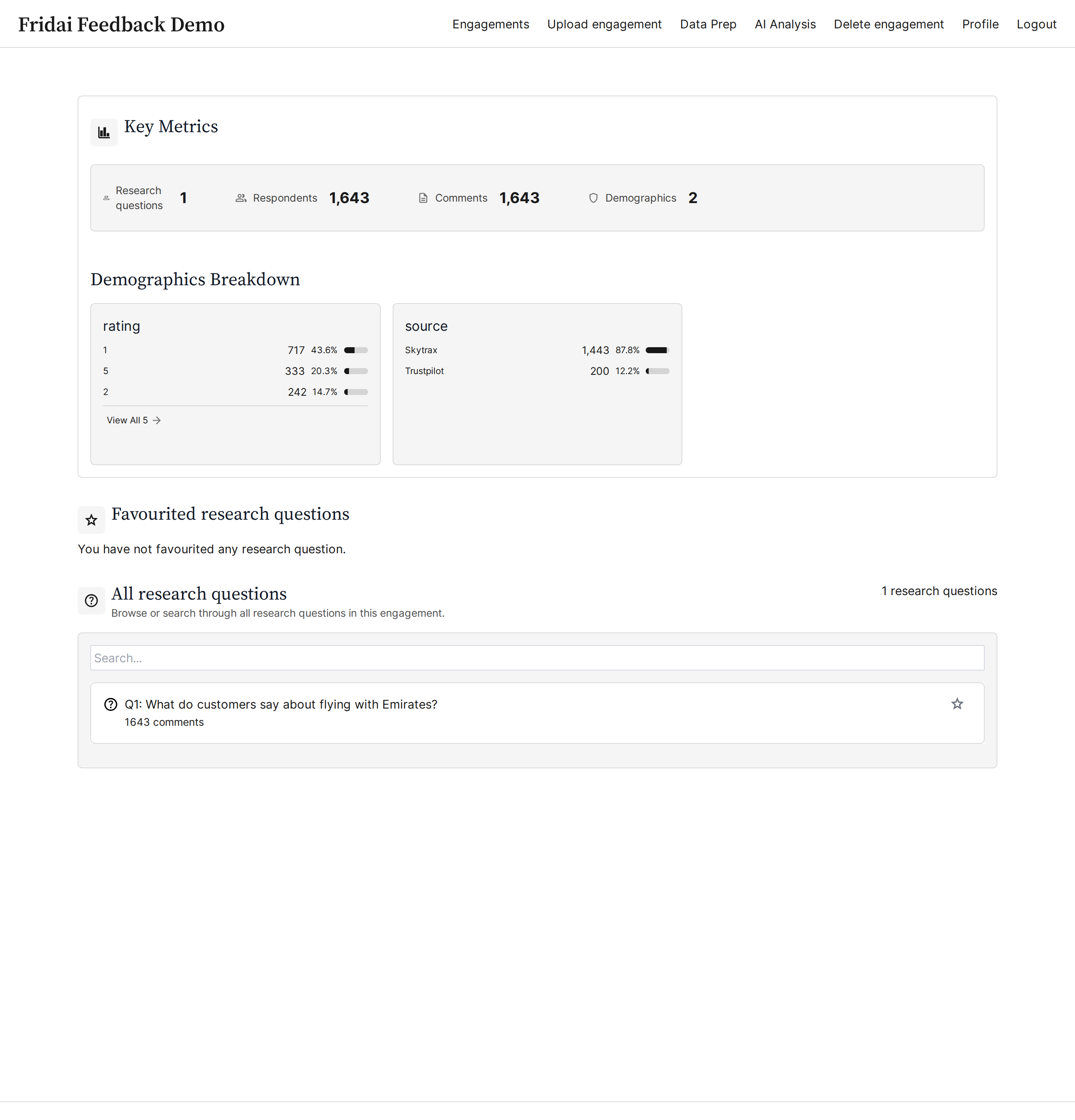
These are screens from the running app analysing 1,643 real Emirates reviews. Run the bundle below and every one of them is yours to open on your own machine.
Comment volume, ratings and source breakdowns, and the research questions behind the analysis. The whole engagement on one screen, over 1,643 real Emirates reviews.
The AI groups its themes into parent categories you expand into their child themes. Each row carries a mention count and its share of the corpus; click one to pull up the comments behind it.
Search the comment text by keyword and stack filters: sentiment, theme, rating, source, date. Here "delay" takes 1,643 comments down to 213, with every match highlighted in place.
Each comment shows whether it is still AI-mapped or Analyst Verified, next to the themes and sentiment the AI assigned. An analyst confirms or corrects each one before it counts toward the reported numbers.
Run it yourself
Everything above is a real product. Clone the bundle and the same dashboard comes up on your machine, pre-loaded with the analysed Emirates data. You do not need an account or a sales call.
git clone https://github.com/fridai-dot-dev/agora-demo
cd agora-demo && docker compose up -d
# → http://localhost:3000  (login: demo / agora-demo)